agent-browser is a Vercel Labs project: a headless browser CLI designed to be driven command-by-command from a shell, with a native Rust binary and a focus on AI agent use. I installed it, read its source, then read Playwright's source to verify the claims. The real story is more interesting than the README suggests.
Architecture: what "Rust CLI" actually means
The install is one line:
npm install -g agent-browser
agent-browser install   # downloads Chromium
The binary is a native Rust ELF executable — confirmed, not a Node wrapper. But "Rust = fast browser automation" is the wrong frame. The Rust binary is a thin IPC client. It parses your command, connects to a persistent daemon via a Unix socket, sends a JSON message, and prints the formatted response. The actual browser driving — Chromium, Playwright, all of it — runs in the daemon. By default, the daemon is TypeScript.
The latency wins are real but modest: close and snapshot run in ~170ms because it's socket IPC, not process startup. Open is network-bound. The Rust layer probably saves 50–80ms vs a Node.js CLI equivalent. That's not the point of the project — the point is the interaction model.
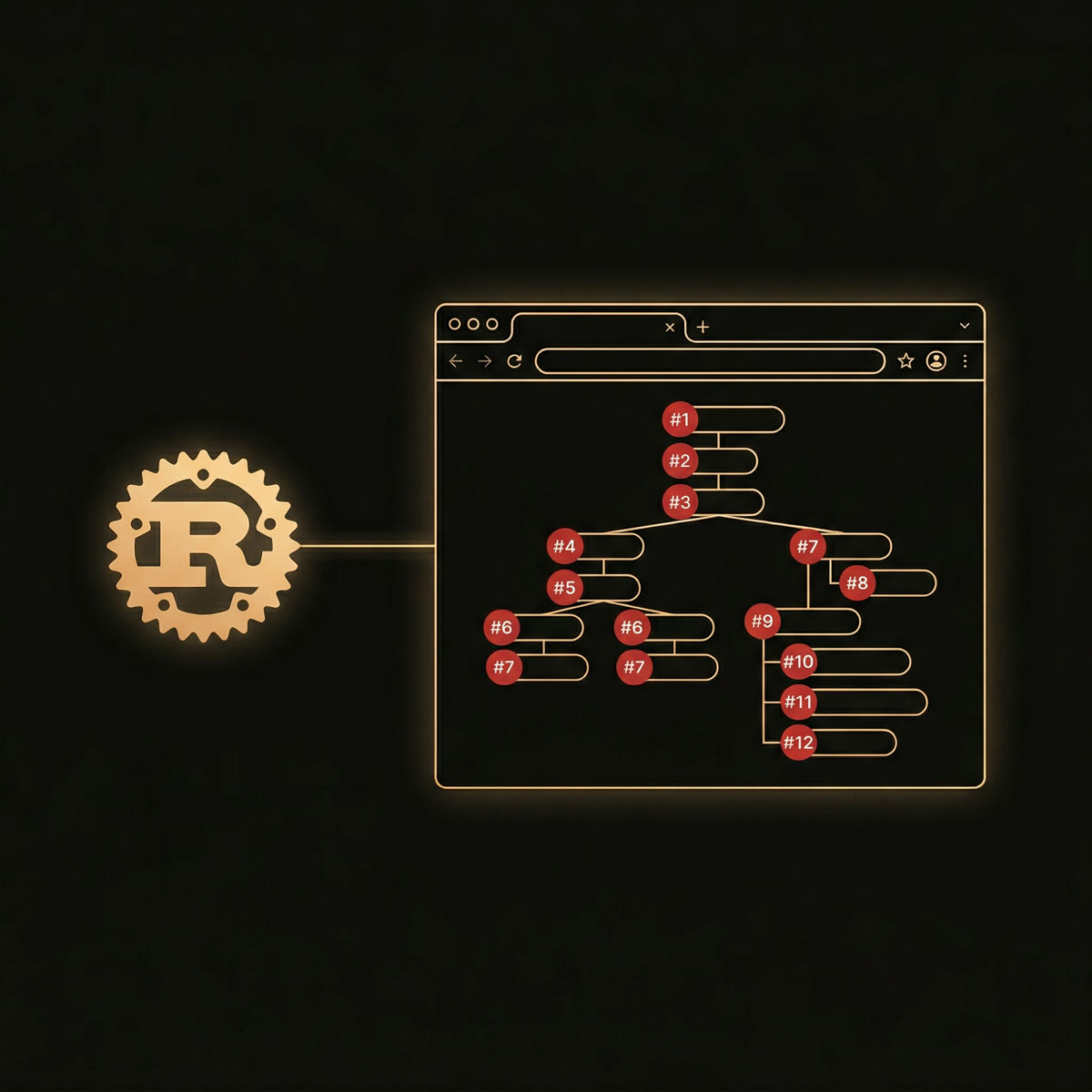
The snapshot model — and why Playwright's public API falls short
This is the actually interesting part. agent-browser's core command is snapshot, which returns a clean accessibility tree with stable element references:
- document:
  - heading "Example Domain" [ref=e1] [level=1]
  - paragraph: This domain is for use in illustrative examples...
  - paragraph:
    - link "Learn more" [ref=e2]:
      - /url: https://iana.org/domains/example
Those [ref=e1] markers are the critical thing. You use them directly to interact:
agent-browser fill @e26 "performance profiling"
agent-browser press Enter
Playwright does have an ariaSnapshot() method on locators. Here's what it actually returns on the same page:
- document:
  - heading "Example Domain" [level=1]
  - paragraph: This domain is for use in illustrative examples...
  - paragraph:
    - link "Learn more":
      - /url: https://iana.org/domains/example
No refs. The public Playwright API — locator.ariaSnapshot() — runs in mode: 'expect' internally, which sets refs: 'none'. It's designed for test assertions (expect(locator).toMatchAriaSnapshot(...)), not for agents that need to act on what they see. And the older page.accessibility.snapshot() API you might have read about? Completely removed from current Playwright — not deprecated, gone.
So agent-browser wraps the public Playwright ariaSnapshot output and bolts on its own ref generation — incrementing a counter (e1, e2, ...) and mapping each ref back to a getByRole() locator for subsequent commands. It's filling a genuine gap in Playwright's public API.
There's a twist: Playwright does have a proper AI-mode snapshot internally — mode: 'ai', with refs: 'interactable', cursor-pointer awareness, and incremental snapshots that only send what changed. It's used by Playwright's own MCP implementation. But it's marked internal: true in the protocol and not in the public API. agent-browser doesn't use it. The internal Playwright AI mode is actually more capable — and agent-browser doesn't know it exists.
The annotated screenshot
agent-browser screenshot --annotate overlays the element refs directly onto a visual screenshot. Each interactive element gets a red numbered badge — the same number as its @e ref:
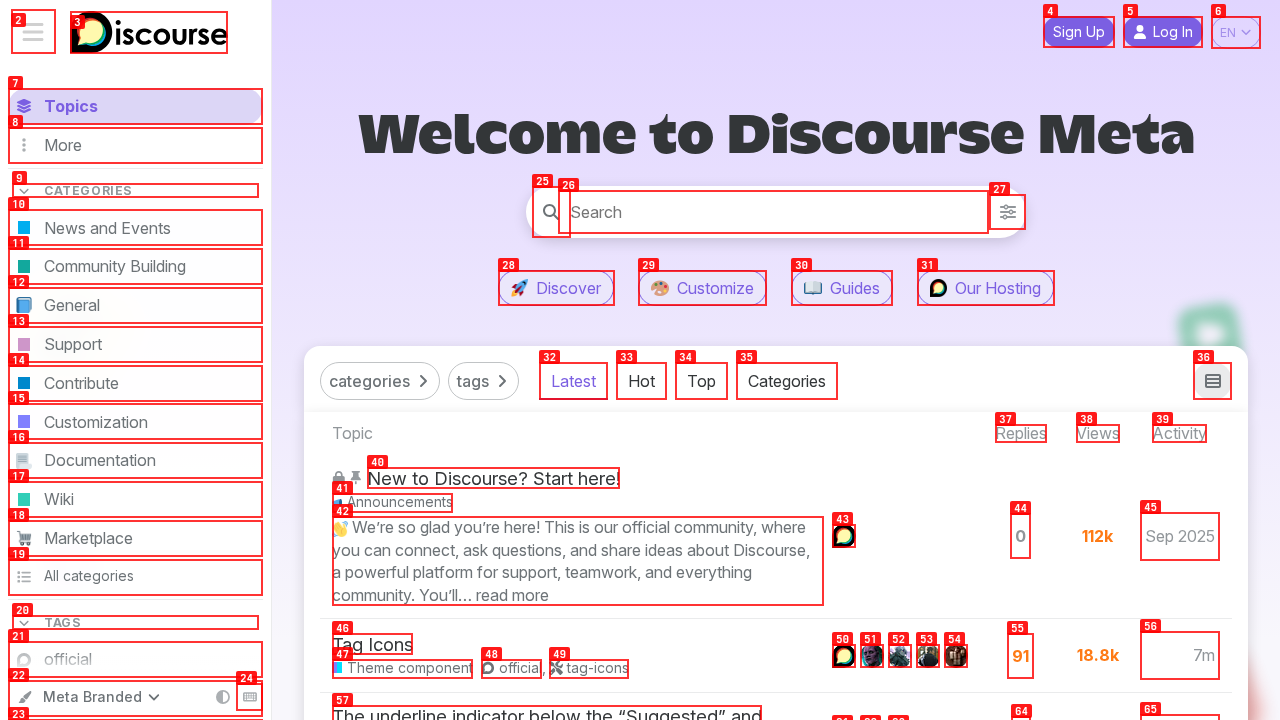
@e26 is the search box. @e4 is Sign Up. Visual and textual representations in sync.This has no Playwright equivalent, including in their MCP. Playwright MCP can screenshot a specific element by ref, but there's no visual overlay annotation. For multimodal workflows — feed screenshot to a vision model, let it reason about visual layout, then act using refs — this is a distinct capability that you'd have to build yourself in raw Playwright.
Snapshot filtering flags
Four flags on snapshot that are worth knowing:
-i(interactive only) — strips everything except interactive elements (buttons, links, inputs, etc.). On a complex SPA this goes from hundreds of lines to a handful. Token cost drops dramatically.--cursor— adds elements withcursor: pointer,onclick, ortabindexthat lack ARIA roles. Catches JS-heavy apps that don't use proper accessibility attributes.--depth N— limits tree depth. Useful for orientation on a new page before drilling down.--compact— removes structural wrapper elements with no meaningful content, keeping only nodes that carry refs or text.
In practice, snapshot -i is what you want most of the time. On Discourse Meta with ~300 interactive elements, the full snapshot is several hundred lines; -i cuts it to the actionable subset.
The diff commands
Not in the README prominently, but genuinely useful: agent-browser diff snapshot and agent-browser diff screenshot. I ran both so you can see what they actually produce.
Screenshot diff does pixel comparison using the browser's own Canvas API — spins up a blank page, loads both images via intercepted routes (to stay under CDP message size limits), runs RGBA channel comparison per pixel, outputs a diff image with changed pixels in red. Here's the result of collapsing a Wikipedia TOC section:
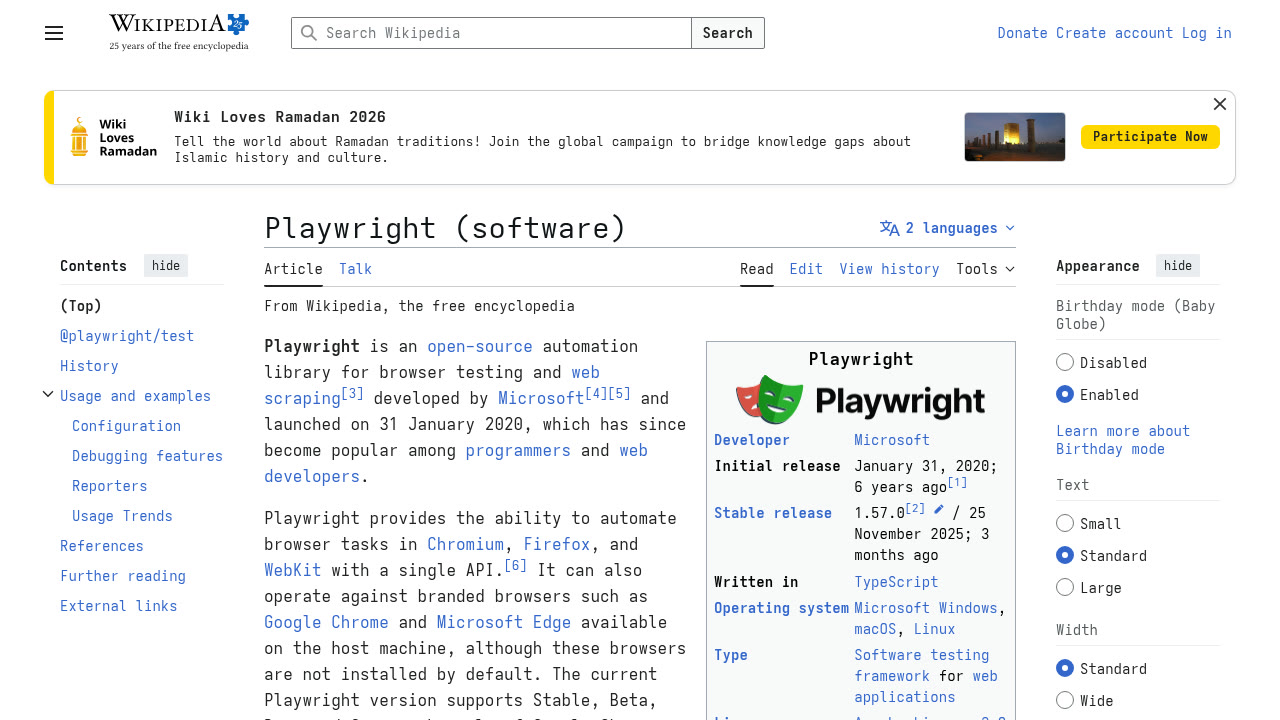
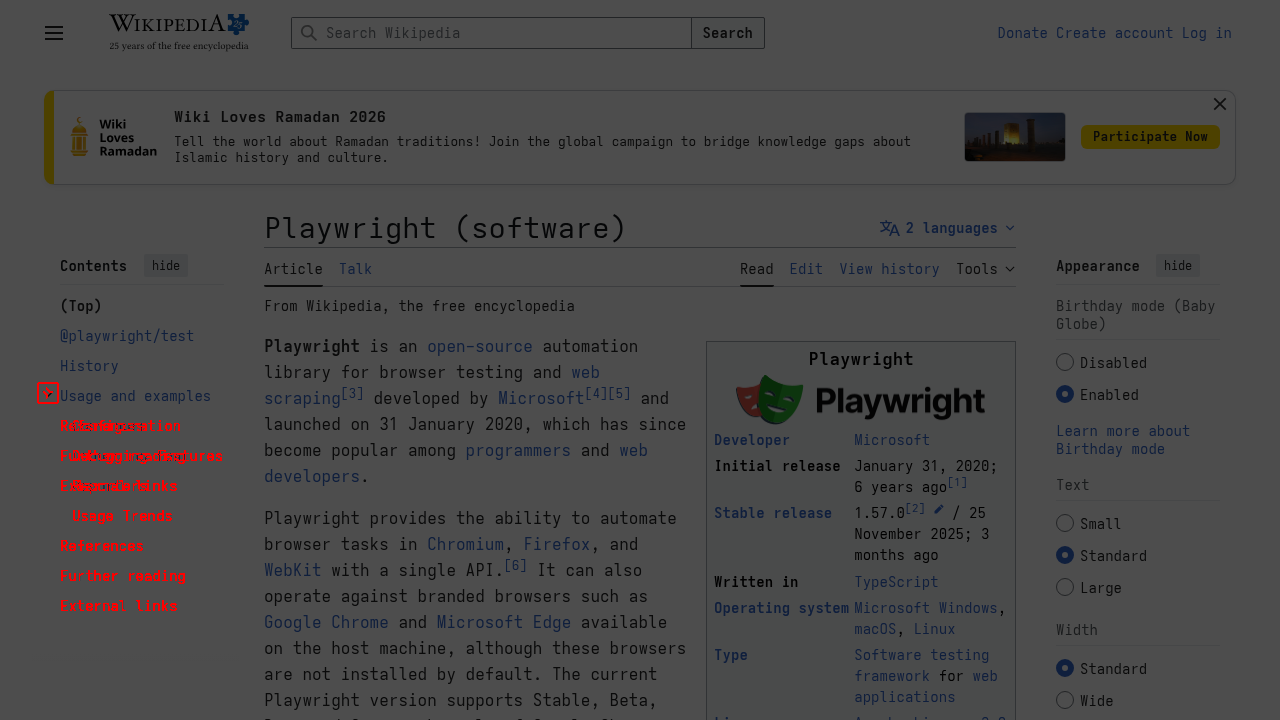
Toggle Usage and examples subsection: 0.42% of pixels changed. Only the TOC entries are red — the content, header, and sidebar are untouched. This is what surgical pixel diff looks like.Snapshot diff runs Myers algorithm on two accessibility trees and returns additions/removals as a unified diff. I took a baseline snapshot on Hacker News, clicked "hide" on the top story (which redirected to a login wall), then ran diff snapshot:
agent-browser snapshot   # baseline captured implicitly
agent-browser click @e16 # "hide" link on story #1
agent-browser diff snapshot
- - link "Don't Make Me Talk to Your Chatbot" [ref=e12]
- - link "raymyers.org" [ref=e13]
- - link "pkilgore" [ref=e14]
- - link "hide" [ref=e16]
- - link "86 comments" [ref=e17]
  [... 220 more removals ...]
+ - text: You have to be logged in to hide. Login
+ - textbox [ref=e2]   # username
+ - textbox [ref=e4]   # password
+ - button "login" [ref=e5]
+ - link "Forgot your password?" [ref=e6]

27 additions, 224 removals, 0 unchanged
The tree went from 224 interactive elements (the full front page) to 11 (a login form). The diff tells you exactly what the action did — no assertions, no selectors, just a structural account of what changed. Useful for verifying form submissions, modal appearances, or any state transition an agent cares about.
Neither has a direct Playwright equivalent as a built-in command — you'd construct this yourself in a script.
Session state persistence
agent-browser supports saving and restoring full browser state — cookies, localStorage, sessionStorage — between sessions:
agent-browser open https://app.example.com
# ... log in manually or programmatically ...
agent-browser state save my-login
agent-browser close

# Later:
agent-browser open https://app.example.com --session-name my-login
# Logged in, cookies restored
State files are encrypted with AES-256-GCM when an encryption key is set, and auto-expire after 30 days. Playwright has storageState() for the same thing, but you manage the file yourself in the script.
Playwright's hidden AI mode
Here's where the comparison gets interesting. While agent-browser is building a tool for driving browsers from AI agents, Playwright quietly shipped the same thing as internal infrastructure for their own MCP server — in April 2025. The source comment says it plainly: "For AI consumption."
The API is page._snapshotForAI(). The underscore means "internal, not for you", but it's not actually enforced — you can call it. Same page, same Playwright install:
// public API
await page.locator('body').ariaSnapshot();

// internal AI mode
await page._snapshotForAI({ track: 'session-id', mode: 'full' });
Public vs AI mode: the actual output
Public ariaSnapshot() — no refs, strict ARIA visibility:
- navigation:
  - link "Home":
    - /url: /home
  - link "About":
    - /url: /about
  - button "Sign in"
- main:
  - heading "Welcome" [level=1]
  - searchbox "Search…"
Internal _snapshotForAI() — refs, cursor hints, wider visibility:
- generic [active] [ref=e1]:
  - navigation [ref=e2]:
    - link "Home" [ref=e3] [cursor=pointer]:
      - /url: /home
    - link "About" [ref=e4] [cursor=pointer]:
      - /url: /about
    - button "Sign in" [ref=e5]
  - main [ref=e6]:
    - heading "Welcome" [level=1] [ref=e7]
    - searchbox "Search…" [ref=e8]
Every node gets a [ref=eN], cached on the DOM element itself. Refs are stable as long as the element's ARIA role and accessible name don't change — if you rename a button, it gets a new number and the model treats it as a new element. [cursor=pointer] is computed by walking the ancestor chain checking computed CSS, not guessed from role. [active] tracks focus. generic nodes that the public mode drops entirely appear here because the AI mode uses a wider visibility filter (ariaOrVisible instead of strict aria).
Incremental snapshots
On subsequent calls with mode: 'incremental', Playwright only sends what changed. I mutated three things — changed the heading text, added a nav button, updated the search placeholder — then called incrementally:
-navigation [ref=e2]: - ref=e3 [unchanged] - ref=e4 [unchanged] - ref=e5 [unchanged] - button "Sign out" [ref=e9] - main [ref=e6]: - heading "Welcome back!" [level=1] [ref=e10] - searchbox "Search products…" [ref=e11]
Three unchanged nav links become ref=e3 [unchanged] — a back-reference, no repeated data. Changed container nodes are marked <changed>, only the modified children appear in full. Zero changes = empty string. The track string lets multiple independent conversation threads maintain separate snapshot state. The MCP uses a fixed track key 'response', sends full on first load, then incrementals after every action.
The diff algorithm is ref-based, not positional. When elements are removed and re-added, they get new numbers. The model can tell "this is the same element I saw before" vs "this is a new thing" purely from whether the ref persists.
How agent-browser compares to this
agent-browser's snapshot.ts is 640 lines of independent TypeScript that solves the same problem differently. It calls the public locator.ariaSnapshot(), gets the ref-free text output, then runs regex over it to bolt on its own e1, e2, ... counter. For cursor detection it fires a separate DOM query to find elements with cursor:pointer, onclick, or tabindex. These are two separate implementations of the same idea — not copied code, just parallel work.
The irony is what's in agent-browser's own dependency. playwright-core ships bundled with agent-browser. _snapshotForAI is on the Page object that agent-browser's daemon already holds. I confirmed it:
// inside agent-browser's own node_modules/playwright-core runtime:
'_snapshotForAI' in page  // → true
The actual snapshot call in agent-browser today, line 275 of snapshot.ts:
const ariaTree = await locator.ariaSnapshot();  // public API — no refs
// 640 lines of text parsing follows to reconstruct what _snapshotForAI gives natively
Replace that one call with page._snapshotForAI({ track, mode }) and most of snapshot.ts becomes dead code. Native refs, native cursor hints, incremental diffs, cross-iframe frame-stitching — all in one call, no text parsing. The only genuine trade-off is stability: _snapshotForAI could change between Playwright versions without a changelog entry. But that's a reasonable risk to take on a private API inside your own pinned dependency. There's a GitHub issue requesting a public API if Vercel wants to wait for that instead.
The --native flag: removing the Node.js layer entirely
v0.16.0 added an experimental --native flag (or AGENT_BROWSER_NATIVE=1) that replaces the Node.js daemon with a second Rust binary that talks to Chrome directly via CDP WebSocket. No Node.js. No Playwright. No V8. The Rust binary is the daemon.
agent-browser --native open https://example.com
agent-browser --native snapshot
The existing architecture has two hops: Rust CLI → Node daemon → Chrome. Native collapses it to one: Rust CLI → Rust daemon → Chrome. The implementation is 16,500 lines of new Rust — CDP types, a WebSocket client, its own ARIA tree builder, interaction primitives, diff logic, session state, the lot.
Performance: what actually changes
I benchmarked both modes against Hacker News:
| Operation | Node daemon | Native daemon |
|---|---|---|
| Cold start + navigate | 939ms | 314ms |
| Snapshot (warm) | 190ms | 185ms |
| Snapshot (2nd call) | 174ms | 175ms |
Cold start is ~3x faster — that's eliminating V8 startup and Playwright module loading. Warm commands are identical to within noise. Once the daemon is up, both modes make the same CDP WebSocket roundtrips to the same Chrome process. The bottleneck is the CDP calls, and those are the same either way.
For agent use cases — where the daemon stays warm for the duration of a task — the cold start win is a one-time cost. Meaningful for fast, stateless tool invocations; irrelevant for anything session-based.
The snapshot quality gap
Both modes call Accessibility.getFullAXTree via CDP. What they do with the result is different.
The Node daemon pipes the raw AX tree through _snapshotForAI() — which, as we just saw, compacts the tree, suppresses internal implementation nodes, and adds semantic metadata. The native daemon's Rust ARIA renderer reimplements this from scratch, and it's not there yet. Same page, same browser — Node daemon first:
- document:
  - heading "Example Domain" [ref=e1] [level=1]
  - paragraph: This domain is for use in illustrative examples...
  - paragraph:
    - link "Learn more" [ref=e2]:
      - /url: https://iana.org/domains/example
Native daemon, same page:
- heading "Example Domain" [level=1, ref=e1]
  - StaticText "Example Domain"
    - InlineTextBox "Example Domain"
- paragraph
  - StaticText "This domain is for use in illustrative examples..."
    - InlineTextBox "This domain is for use in illustrative examples..."
- paragraph
  - link "Learn more" [ref=e2]
    - StaticText "Learn more"
      - InlineTextBox "Learn more"
Nearly twice as long, full of StaticText and InlineTextBox nodes that are Chrome implementation details, not semantic content. The link's href is gone. For an AI agent reading this tree, that's noise that costs tokens and buries the signal.
The annotate gap
The annotated screenshot is not implemented in the native daemon. There is no annotate handler in its dispatch table. Pass --annotate to a native daemon and it silently takes a plain screenshot — no overlays, no legend, no ref mapping. The Node daemon injects a CSS overlay before screenshotting; the Rust daemon would need to replicate that via Runtime.evaluate, which is straightforward but hasn't been done.
Setup friction
The Node daemon auto-discovers Playwright's Chromium installation. The native daemon doesn't — it looks for a system Chrome and fails in containerised environments without help:
AGENT_BROWSER_NATIVE=1 AGENT_BROWSER_EXECUTABLE_PATH=/path/to/chrome \
  agent-browser open https://...
v0.16.1 added auto---no-sandbox detection for Docker, but auto-discovery of Playwright's Chrome install is still missing.
Bottom line on --native
The cold-start win is real and the architecture is correct. But the snapshot quality regression — losing exactly the _snapshotForAI polishing that the Node daemon gets for free — and the missing annotate support make it a poor drop-in replacement today. The Rust ARIA renderer needs another pass before it matches what the default mode delivers.
Where Playwright is still better
- Incremental snapshots. Playwright's internal AI mode tracks what changed between snapshots and only sends the diff —
ariaSnapshotDiff. On a long-running session with large pages, that's a meaningful token saving. agent-browser always sends the full tree. - Conditional logic and flow control. Retry on element state, loops, branching — all require shell scripting or wrappers. In a Python Playwright script it's native.
- SPA network timing.
agent-browser wait --load networkidletimed out against Discourse's long-polling websocket. Playwright gives you more surgical wait strategies from script — wait for specific network requests, poll element presence, set per-action timeouts. - In-flight data processing. Extract data, transform it, write to a file, branch on results — all in one Python process. agent-browser hands you text; anything beyond that is downstream shell work.
- Multi-context parallelism. One browser context at a time. Concurrent use means concurrent daemons.
- Maturity. v0.16, Vercel Labs project. Playwright is years of production hardening across three browser engines. The gap will close; it's real now.
Ready-made skill
If you're wiring agent-browser into an AI agent via something like term-llm, here's a complete skill file. Drop it in your skills directory, load it when you want the agent to drive a browser. The whole interaction model — refs, diffs, session state — is in there so the model doesn't have to guess at syntax.
agent-browser.md — click to expand and copy
---
name: agent-browser
description: Control a headless browser via the agent-browser CLI for web navigation, scraping, form filling, screenshots, and page diffing. Use when: asked to visit websites, extract content, interact with elements, take annotated screenshots, or verify page state changes.
---

## Setup

agent-browser uses a persistent daemon — the first command spawns it,
subsequent commands are ~170ms IPC calls. No explicit daemon management needed.

```bash
npm install -g agent-browser
agent-browser install   # downloads Chromium
```

## Core Workflow

1. **Open** → 2. **Snapshot** → 3. **Interact via refs** → 4. **Repeat or diff**

Always start with `snapshot -i` to get the interactive element map before acting.

## Command Reference

### Navigate
```bash
agent-browser open <url>
agent-browser close
```

### Snapshot — accessibility tree with element refs
```bash
agent-browser snapshot            # full tree
agent-browser snapshot -i         # interactive only (links, buttons, inputs)
agent-browser snapshot -i -C      # + cursor-interactive (JS onclick/tabindex, no ARIA)
agent-browser snapshot -c         # compact: strip empty structural wrappers
agent-browser snapshot -d 3       # limit tree depth
agent-browser snapshot -s "#main" # scope to CSS selector
```

Output looks like:
```
- heading "Sign in" [ref=e1] [level=1]
- textbox [ref=e2]
- button "Search" [ref=e3]
- link "Forgot password?" [ref=e4]
```

Refs (`@e1`, `@e2`, …) are used in all subsequent interaction commands.
They reset on navigation — re-snapshot after any page load.

### Interact
```bash
agent-browser click @e5            # click by ref
agent-browser click "Submit"       # click by visible text
agent-browser fill @e7 "value"     # fill input by ref
agent-browser press Enter          # key: Tab, Escape, ArrowDown, Space, etc.
agent-browser eval "document.title"
```

### Screenshots
```bash
agent-browser screenshot                      # viewport
agent-browser screenshot /tmp/out.png         # save to path
agent-browser screenshot --annotate           # overlay red ref badges on every element
agent-browser screenshot --annotate out.png   # annotated + saved
```

`--annotate` is the key feature for multimodal pipelines: take an annotated
screenshot, send to a vision model, let it reason about visual layout, then
act using the refs it returns.

### Wait
```bash
agent-browser wait                           # default page load
agent-browser wait --load domcontentloaded   # lighter
agent-browser wait --load networkidle        # avoid on long-polling / websocket apps
```

### Diff
```bash
# Snapshot diff — compares current tree against last snapshot in this session
agent-browser snapshot    # implicit baseline
# ... interact ...
agent-browser diff snapshot

# Snapshot diff against a saved file
agent-browser snapshot > baseline.txt
# ... interact ...
agent-browser diff snapshot --baseline baseline.txt

# Screenshot diff — pixel comparison, changed pixels in red
agent-browser screenshot baseline.png
# ... interact ...
agent-browser diff screenshot --baseline baseline.png --output diff.png

# URL diff — compare two pages directly
agent-browser diff url https://staging.example.com https://prod.example.com
agent-browser diff url https://v1.example.com https://v2.example.com --screenshot
```

### Session state
```bash
agent-browser state save my-session
agent-browser open <url> --session-name my-session  # restore cookies + localStorage
```

### Page data
```bash
agent-browser data    # title, URL, meta tags, Open Graph data
```

## Patterns

**Find and fill a search box:**
```bash
agent-browser open https://example.com
agent-browser snapshot -i
agent-browser fill @e8 "search term"
agent-browser press Enter
agent-browser snapshot
```

**Verify an action had the expected effect:**
```bash
agent-browser snapshot          # implicit baseline
agent-browser click @e5
agent-browser diff snapshot     # shows exactly what changed in the tree
```

**Login once, persist session:**
```bash
agent-browser open https://app.example.com
agent-browser fill @e2 "user@example.com"
agent-browser fill @e3 "password"
agent-browser click @e4
agent-browser state save app-session
# Future runs:
agent-browser open https://app.example.com --session-name app-session
```

**Multimodal — vision model picks the element:**
```bash
agent-browser screenshot --annotate /tmp/view.png
# Send view.png to vision model: "which element should I click?"
# Model returns ref (e.g. e14) → agent-browser click @e14
```

## Tips

- Always `snapshot -i` first — drops token cost dramatically on complex pages
- Add `-C` on JS-heavy apps that use `onclick`/`tabindex` without ARIA roles
- `diff snapshot` is reliable for confirming state changes after actions
- For SPAs with websockets/long-polling, skip `--load networkidle` — it times out;
  snapshot-poll instead
- Refs are session-stable but reset on navigation; always re-snapshot after a page load
Verdict
The actual value isn't "no Python scripting" — a well-structured Playwright skill can wrap scripts just as cleanly. It's two things:
First, the ref system fills a genuine gap in Playwright's public API. locator.ariaSnapshot() gives you a semantic tree with no way to act on it. agent-browser adds the ref layer that Playwright's own internal AI mode has but won't expose publicly. Until Playwright ships that as a proper API, agent-browser is a reasonable proxy.
Second, the annotated screenshot is a real capability for multimodal pipelines. It's not something you can easily replicate without custom instrumentation.
The incremental snapshot story cuts the other way: Playwright's internal AI mode is more token-efficient for long sessions, and agent-browser doesn't benefit from it because it wraps the public API. That's a gap that may matter more as pages get larger.
The --native flag is worth watching. Removing Node.js from the stack is the right long-term move, and the cold-start numbers prove the point. But the Rust ARIA renderer currently produces noisier output than the Node daemon, and annotate is missing entirely. Use it when it matures.
One genuine surprise: it ran on Arch Linux on the first try, against the Ubuntu fallback Chromium build, with no library errors. That's usually where these tools fall apart. It didn't.